
Gone are the days of bulky headphones (though, those made a comeback) and wired earphones; enter Apple AirPods! Those cute little devices which sit neatly in your ears with nothing to interfere with them can be seen on numerous people walking down the street or going for a run. They’re practically everywhere!
Of course, as with any other gadget or electronic, if you want your AirPods to serve you well (and long), they need to be cleaned. In fact, they are probably one of the dirtiest things you own because AirPods need to be inserted directly into your ears, picking up earwax and sweat easily. If left exposed, dust and dirt will also stick to the earwax on the outer surface and speaker, turning them into a whole other level of ickiness.
Nevertheless, dirty AirPods do not mean it’s time to replace them with new ones but rather, clean them up real good! In this article, we will guide you on how to keep your AirPods clean and ready for non-icky use, as well as the charging case which is equally important to maintain.
Cleaning AirPods the Apple Way

Who better than the company itself to tell you how it’s done. Apple has set about cleaning methods on what is to be used, and how to use these tools/solutions whilst cleaning their devices. Since AirPods are delicate, do not use anything abrasive or harsh. Tools of choice are Q Tips/cotton swabs, cotton balls, and soft lint-free cloths. It is very important to note that the AirPods are not waterproof so running under or submerging in water or any cleaning agent is a hard NO.
The Apple AirPods Cleaning Method

- Clean the speaker and mic meshes with a dry cotton swab.
- Then use a toothpick to gently scrape out the earwax and dirt from the meshes. Do this as carefully as possible to prevent damaging the mesh.
- Wipe with a soft, lint-free cloth dampened with fresh water to remove the loosened grime.
- Dry immediately with a lint-free towel.
WARNINGS:
- Do not place the Airpods back into the charging case before they are completely dry.
- The same goes for using them while still damp.
The Apple Method for Cleaning AirPods Pro

AirPods Pro are made to be water resistant but that doesn’t mean they won’t get damaged when exposed to excess water. There are, however, certain parts that can be washed under a faucet such as the silicon tips that help give a tighter fit in your ears. They can be detached from the ear pieces and washed thoroughly under running water till they look as good as new; reattach them when completely dry.
Just like AirPods, the Pro version cannot be run under or submerged in water to clean. Instead, clean your AirPods Pro with a dampened Q Tip (be sure to squeeze out excess water), and then wipe with a dry lint-free cloth. In the same manner as cleaning AirPods, you can clean out the meshes with a toothpick, and wipe over them with a damp cloth; allow them to dry completely thereafter.
The Charging Case Cleanup

Take a peek inside the charging case and chances are that it’s as filthy as your AirPods were before cleaning them. That’s because, over a period of time, the same dirt that’s stuck to the Pods gets transferred to the case.
Since this case houses the all-important charging points, it certainly can’t come in contact with water. Instead, here is what you need to do to clean your AirPods charging case:
- With a medium strength toothbrush dampened in water (flick off excess water), start scrubbing the hinge and surrounding area to loosen up the dirt.
- Clear away the debris with a cotton ball or Q Tip.
- For stubborn dirt, spritz a Q Tip with isopropyl alcohol, and then scrub the case gently.
- Wipe dry with a soft lint-free cloth.
Cleaning the Charging Bays

Inside the holding area (where the stems sit), you’ll find the charging bays at the bottom of the case. They house the charging contacts responsible for keeping your AirPods activated. Unfortunately, a lot of dirt makes its way to the contacts which can hinder their performance. So, to clean the charging bays of your AirPods charging case, a dry cotton swab is usually sufficient, however, if there is stuck-on dirt, this can be removed by spritzing the Q Tip with either isopropyl alcohol or water, and then cleaning.
Cleaning the Lightning Port
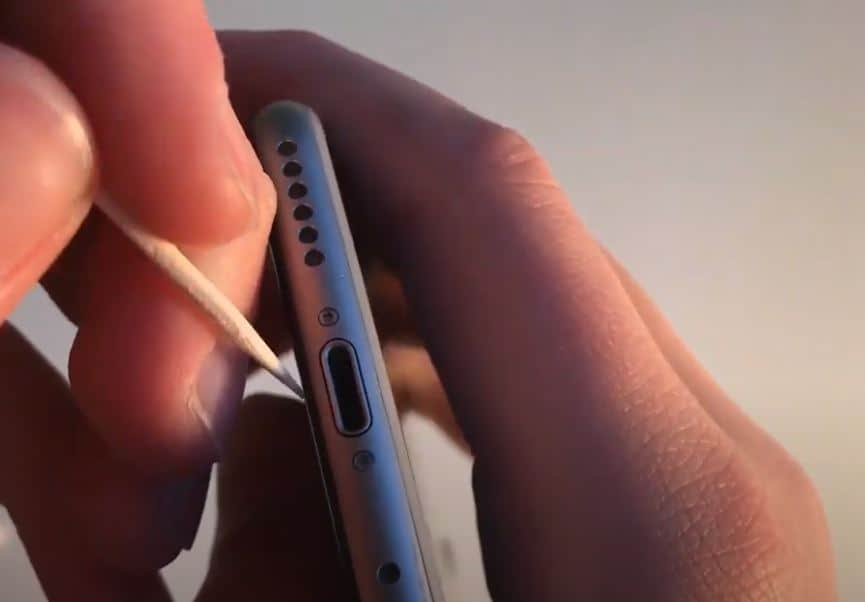
Another hard to reach spot is the lightning port on the underside of the charging case. Q Tips won’t be useful here as the opening is too small, nor should one be forced inside. A SIM card slot key, straightened out paper clip, and toothpicks all make handy tools for the cleanup task, bearing in mind that there are charging points inside the cavity which requires gentle pressure to avoid damaging.
What Not to Use When Cleaning AirPods
While the above tips take care of which tools to use while cleaning your AirPods and AirPods Pro, here’s what you should never use:
- Compressed air is the number one enemy as it can damage the delicate internal components and is therefore advised against.
- Bleach; although it will make your AirPods spotlessly white, the harshness of the chemical will damage the casing while leaving behind a residual substance which is harmful to the user.
To sum up, it’s best to clean your AirPods regularly to avoid tackling a load of filth. An additional tip (and obvious one) would be to clean your ears before using them, therefore, limiting the earwax and dirt buildup. This will not only help to keep your devices in top condition but also prevent a potential ear infection by pushing bacteria into your ears.
Frequently Asked Questions
How Do I Remove Earwax From My Airpods?
Although this method can be damaging if you are not careful, the safest way to remove earwax from AirPods is with a toothpick. The trick is to gently clean away from the mesh as opposed to pushing down against it. Once you have removed a large part of the earwax mass, finish off by brushing the mesh lightly with a clean, soft-bristled toothbrush.
Does Apple Provide an AirPod Cleaning Service?
Yes, physical Apple stores generally offer free AirPod cleaning, as well as servicing of the product for battery and/or sound quality issues (if the AirPods are still under warranty). Their technicians can also give you a better understanding of how to safely clean and care for your Apple earbuds at home.
What Happens if I Drop My AirPods in Water?
Apple AirPods and the AirPods Pro are not water resistant; therefore, they can get damaged if submerged in water. This is in spite of the fact that they are fitted with water-resistant seals, however, they are only effective in protecting the earbuds from sweat and moisture. It should also be noted that the seals become weak and less effective over time.
Can I Remove Water From My AirPods Using the Water Eject Shortcut on iPhone?
Yes, the Water Eject Siri Shortcut was created for iOS to push out water from inside the AirPods using sound waves with an ultra low frequency. This function must be used as soon as possible before the water dries up or causes internal damage.
How Do I Use the Water Reject Siri Shortcut for My AirPods?
Connect the AirPods to your iPhone via Bluetooth > Find the Water Eject Siri Shortcut on your iPhone and tap on it > hold one AirPod in each hand, and use your thumb and index finger to cover the small sensors located on both sides of the earbud > tap ‘Begin Water Ejection’ on your iPhone > allow it to finish, and repeat the water ejection function multiple times until there is no more water coming out through the mesh of your AirPods